Introduction
This is part 6 of the Agentic Scrum series, and it covers the piece I left out of the first five.
Part 5 ended at the final gate. Here I show how the agents from Parts 2 to 5 are wired together, what exactly happens when one agent hands over to the next, and where this setup can still fail. If you have not read the series, Part 1 is the place to start.

|
My company, Endpoint Cybersecurity, offers consulting on how to prepare for TISAX, ISO27001, NIS2, CSMS and SOC2 audits. It also works with companies to create and deploy a Secure Software Development Lifecycle, with various levels of AI support. |
|
||
| Get in touch with us here: https://www.endpoint-cybersecurity.com/contact/ |
The Runner
The agents in the earlier parts never call each other. Something else has to pick the next stage, start the agent, check what it did and stop at the gates.
I call that the Runner, and yes, it is not a coincidence that it is called like the GitHub Runner. 🙂
My recommendation, and it is an opinion and not a measured result, is plain code and not another agent. The order of the stages and the gates are the parts you want identical on every run, and an agent that decides which agent runs next can improvise exactly where you want no improvisation.
Here is the whole flow in one picture. The top half shows the stages and gates the runner moves through, and where work goes when something fails. The bottom half zooms into a single agent stage, which is where one agent hands over to the next.

State lives in a file
The runner keeps no memory between runs. Everything it needs sits in a status.md next to the specs, in markdown with one heading per field and one line per value. A person can read it and fix it by hand, and git keeps its history.
# Status: 042 invoice export

## Stage
qa_draft

## Coding runs
2

## Blocked at
none

## Waiting for
nobody
Stage names the next thing to happen. Coding runs counts how often the coding agent has started on this feature. Blocked at and Waiting for tell a human where the loop stopped and who has to act. If the runner crashes halfway, you start it again and it carries on from what the file says. No agent may change this file. If an agent could edit it, it could approve its own gate, so the runner treats any agent edit to status.md as a violation and blocks.
What exactly happens at a handover
Take one boundary. The coding agent has finished and the QA agent is next. These are the steps, in order. The runner asks git which files really changed on the feature branch and writes that list to a file. It fills in the QA prompt template and commits both files, so the record shows exactly what the agent was given. It starts a new agent session with that prompt. The agent reads the files the prompt names, writes its outputs and writes its handover. The runner then checks the result. If the checks pass, it commits and moves the stage forward. If any check fails, it blocks.
This is handover 02, written by the coding agent at the end of its run. The numbers and file names in these examples are made up for illustration.
# Handover 02: coding agent

## Asked
Implement tasks 1 to 3 of agent-spec.md.

## Done
All three tasks. Access logging added after R2 was clarified.

## Deliberately not done
Scheduled exports (out of scope).

## Files changed
src/exports/service.ts, src/exports/writers.ts, src/exports/endpoint.ts

## Checks run
Build: pass. Lint: pass. Existing tests: pass.

## Open questions
None.

## Stop reason
none
And this is the list git produced for the same branch.
src/exports/audit.ts
src/exports/endpoint.ts
src/exports/service.ts
src/exports/writers.ts
They disagree, and that is why the runner hands over both. The handover is what the coding agent says it did. Git is what it did. The runner does not paste either into a chat. It fills in a prompt template that names files and gives rules.
# Task: draft the test specification

Feature folder: {{DIR}}

Read these files, in this order:
{{DIR}}/agent-spec.md
{{DIR}}/requirements.md
{{DIR}}/handovers/02-coding-agent.md
{{DIR}}/logs/changed-files.md
guardrails/qa.md
guardrails/handover-format.md
AGENTS.md

changed-files.md comes from git. Read every file it lists.
If it disagrees with handover 02, trust changed-files.md and
say so under "Open questions" in your handover.

Write these files and nothing else:
{{DIR}}/test-spec.md
{{DIR}}/handovers/03-qa-agent.md

The last section of your handover is "Stop reason", on one line.
Write the single word none if you finished. Otherwise write why you stopped.
AGENTS.md is listed explicitly because not every tool loads it automatically. Claude Code, for example, loads its own CLAUDE.md, so naming the file in the prompt removes the guesswork. The new session remembers nothing about the coding run. Each claude -p call starts a fresh conversation unless you pass --continue or --resume, and the runner passes neither. That costs tokens, because every stage re-reads its files, and I have no numbers on how much. What you buy is that each stage knows only what is written down, which is the whole point of handovers. Here is what the QA agent wrote at the end.
# Handover 03: QA agent

## Asked
Draft the test specification for the invoice export.

## Done
test-spec.md with 11 cases covering R1 to R3, N1 to N3 and F1 to F3.

## Deliberately not done
Test code. It waits for approval of test-spec.md.

## Files changed
test-spec.md

## Checks run
Traceability: every requirement ID has at least one case.

## Open questions
changed-files.md lists src/exports/audit.ts. Handover 02 does not mention it
and agent-spec.md has no task for it. It looks like the logging for N2.
Please confirm before I add a test case for it.

## Stop reason
none
The open question exists only because the QA agent compared the two lists. A human reads it at the next gate and decides. I added the one-line “none” rule for the runner, so put it in your handover format file. The check is strict on purpose. If an agent writes “None.” with a capital and a full stop, the loop blocks and a person takes a look. That is the safe direction to be wrong in.
The runner
Here is the whole runner in bash. It covers the coding stage, both QA stages and the three human gates. The specification agent and the security agent follow the same pattern, and I left them out to keep the length sane. It needs bash 4 or newer because of the associative array, and macOS still ships an older bash by default. Bash is not required either. The logic is about a dozen decisions, so port it to whatever your team maintains.
Download the file: run-loop.txt (rename it to run-loop.sh)The loop at the bottom reads the stage, calls the function with that name and repeats. Agent stages run back to back, so coding flows straight into the QA draft. A gate function prints who it is waiting for and exits, which ends the run. Each stage gets its own tool list. The QA draft agent cannot run make because it has no reason to, and no agent gets git, because the runner does all the committing. Each stage also gets its own scope. The coding agent may touch src/ but not tests/, and the QA agent that writes tests may touch tests/ but not src/.
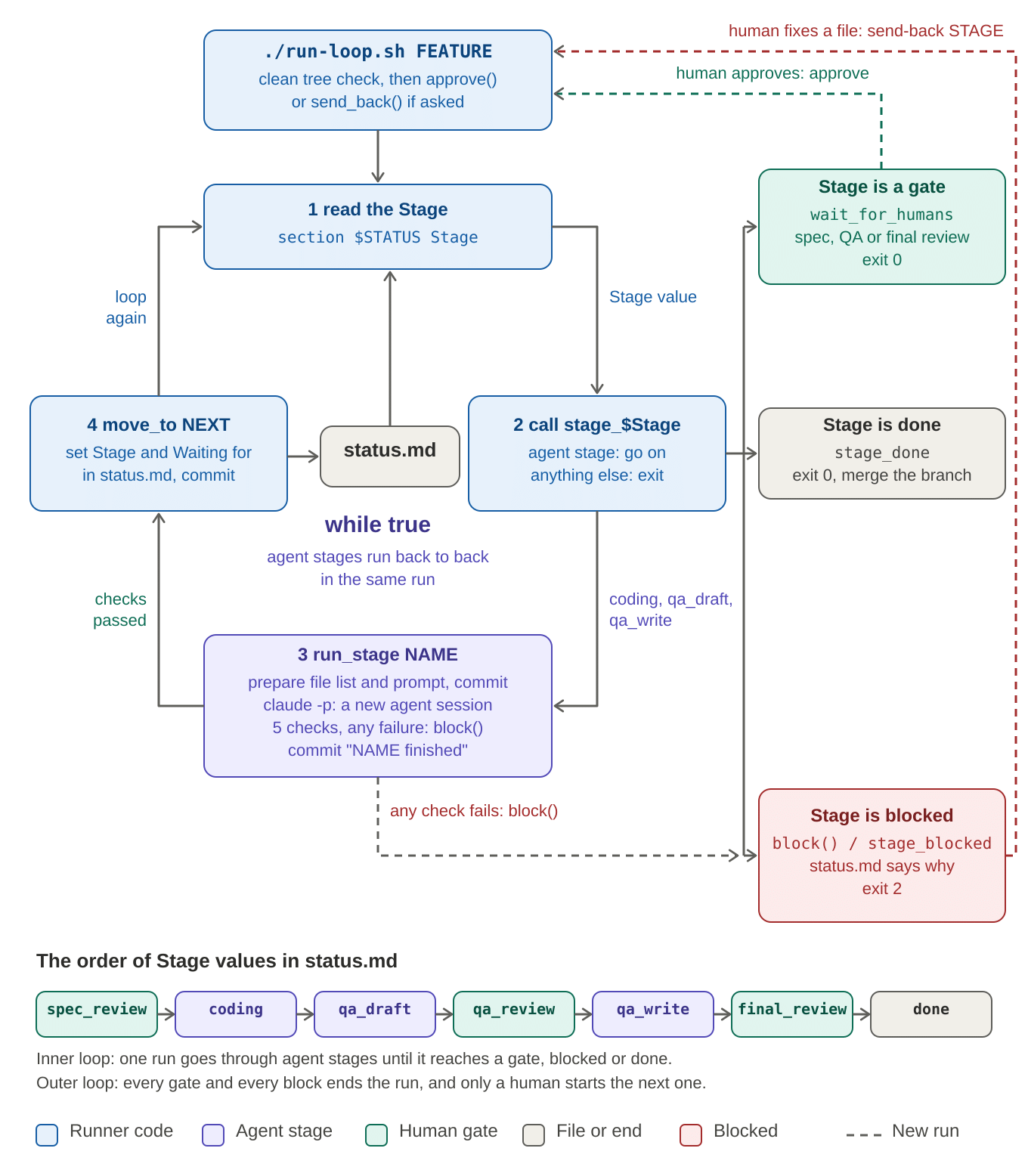
How far I tested this matters, so here it is. I ran every path against a stub that stands in for the agent and writes files the way an agent would. The happy path ran through all three gates to the end. An agent stop reason blocked the loop. So did an edit outside the scope, an edit to status.md, a commit made by the agent itself, a non-zero exit, and a fourth coding run. A dirty working tree was refused, and so was an unknown stage name. I have not run it with a real agent. Expect to adjust the prompts, the scopes and the turn limit once real output arrives.
What the checks do not protect against
Every check runs after the agent has finished, so it detects problems and does not prevent them. If a make target deletes a directory or calls the internet, the scope check notices the changed files afterwards, but the command has already run. Prevention means running the agent somewhere that cannot do damage, such as a container or a disposable CI runner with no secrets except the model API key and no network access beyond what the build needs.
Three details from the Claude Code CLI deserve your attention, and I checked them in version 2.1.318. The help text says the workspace trust dialog is skipped in non-interactive mode, so only run it in directories you trust. It also says that settings files which fail validation are silently ignored in this mode. If your deny rules live in a broken settings file, they are simply gone, so validate that file before you rely on it. And --max-turns appears in the official GitHub Actions documentation but not in the claude --help output of that version, so confirm that your version accepts it.
There is one thing I could not confirm from primary documentation, which is what happens when a non-interactive agent wants a tool that is not on the allow list. Nobody is there to approve it. A secondary source says recent versions deny such calls. Test this with your version before trusting it, because a run that quietly skipped a step looks a lot like a run that finished. Other agent tools have their own non-interactive modes and flags, and I did not check those.
Gates, approvals and sending work back
A human approves a gate by running approve. The runner moves to the stage that follows the gate, records the approver in the commit message and continues until the next gate. A human sends work back by running send-back with a stage name and a reason. Send it back to the stage that owns the earliest wrong file, as Part 1 argued. A vague spec goes back to the specification stage and is regenerated, and everything after it reruns. The coding run limit stops the case where a feature bounces back and forth forever. I picked three as a starting guess, so tune it. A feature that hits the limit usually has a problem in the value statement or the requirements, and no further agent run will fix that. The git log of the feature branch reads like a diary. This excerpt comes from my stub test.
042-invoice-export: next: qa_review
042-invoice-export: qa-draft finished
042-invoice-export: prepare qa-draft
042-invoice-export: next: qa_draft
042-invoice-export: coding finished
042-invoice-export: prepare coding
042-invoice-export: approved spec_review by sorin
Running the same loop in CI
On a laptop, the trouble is that nobody else sees the runs and the guardrails depend on a machine you control. In CI, I would keep the same script and let a pull request review be the approval. Each feature branch has one open pull request. When someone approves it, a workflow runs approve, which moves through the agent stages to the next gate and pushes the commits back to the branch. The workflow file is GitHub’s format, not my choice of format for specs. This is a sketch and I have not run it.
name: Advance the agentic loop
on:
  pull_request_review:
    types: [submitted]
concurrency: loop-${{ github.event.pull_request.number }}
jobs:
  advance:
    if: github.event.review.state == 'approved'
    runs-on: ubuntu-latest
    permissions:
      contents: write
    steps:
      - uses: actions/checkout@v6
        with:
          ref: ${{ github.event.pull_request.head.ref }}
          fetch-depth: 0
      - run: npm install -g @anthropic-ai/claude-code
      - name: Approve the current gate and run to the next one
        env:
          HEAD_REF: ${{ github.event.pull_request.head.ref }}
          APPROVER: ${{ github.event.review.user.login }}
          BASE: origin/main
          ANTHROPIC_API_KEY: ${{ secrets.ANTHROPIC_API_KEY }}
        run: |
          git config user.name "agent-runner"
          git config user.email "agent-runner@users.noreply.github.com"
          code=0
          ./run-loop.sh "${HEAD_REF#feature/}" approve || code=$?
          git push
          exit "$code"
Several things in it need explaining. The push runs even when the runner blocks, because a blocked status that is never pushed is a block nobody sees. The concurrency line stops two approvals from racing each other on the same branch. The workflow fires on any approving review, so as written it would advance on an approval from the wrong person. Add a check of the reviewer against the gate’s owners before you use it. CODEOWNERS on specs/, guardrails/ and prompts/, plus branch protection that requires code owner review, still decides who may merge into main. A prompt template changes agent behavior as much as a guardrail does, so it deserves the same protection.
The default token cuts both ways. GitHub does not trigger workflows on commits pushed with the default GITHUB_TOKEN. That is useful here, because the runner’s own push cannot start another runner and loop. It also means your normal test pipeline will not run on those commits. If you need it to, push with a GitHub App token instead. Remember too that the agent runs inside a job that holds the API key in its environment, so give that job no other secrets.
Anthropic’s Claude Code GitHub Action is the alternative if you prefer it. It runs without waiting for a mention when you give it a prompt input, and claude_args passes CLI arguments. I chose to call the CLI directly so that the laptop and CI run exactly the same script.
What I have not built
The security agent runs in parallel with QA, and the script above does not do that. My design is a second status file, status-security.md, with its own stage functions, started when the coding stage finishes. The final gate refuses to open until both files say done.
I have not written or tested that part. Workflow engines and agent frameworks offer durable state, retries and timers, but I have not evaluated any of them for this purpose.
The design carries over to them because the state and the handovers are files and not something inside the engine.
My own order, again an opinion, is to start with the script, move to CI when a second team joins or an auditor asks who approved what, and consider an engine only when retries and timers become a real problem.
© Copyright 2026 Sorin Mustaca, All rights Reserved. Written For: Sorin Mustaca: Security-AI-Software
Want to work with me on this topic?
Check Endpoint Cybersecurity to see the consulting services we offer.


One thought on “Agentic Scrum: Wiring the Agents Together”
Comments are closed.